If you want your PA system to sound clean, powerful, and reliable, you must understand one core skill: matching Power Amplifiers to your speakers.
Many beginners buy amplifiers based on hype or wattage-only marketing. But real performance depends on a much simpler truth: speakers demand power, and your amplifier must supply it—especially at the low frequencies (bass), where the demand becomes intense.
This guide turns the key lessons from the video into a practical how-to you can use when shopping or setting up.
A speaker system is more than volume. It’s a conversion system:
When the amplifier can’t deliver enough power for the speaker’s demand, you don’t just get “less loud.” You get:
Different frequency ranges demand different power. In general (and as taught in the video):
High-frequency drivers (like tweeters/twitters) typically need less power.
That’s why high-frequency specs often look smaller (hundreds of watts, sometimes less).
Mid-range speakers need more power than tweeters, but not as much as bass.
Mid-range cabinets can typically be driven safely with appropriately sized amplifiers.
Sub speakers / low-end drivers (ground-shakers) are the most demanding.
Low frequencies require big power because they require large cone movement and high-pressure sound output.
So your hardest “power job” is always bass/low end. That’s why low-end systems require bigger amplifiers and careful matching.
Your speakers determine how much power they need—based on:
Your power amplifier supplies the electrical power to drive the speakers.
If your amplifier supply is too small compared to speaker demand, you experience distortion/clipping.
The video describes this as a situation where the amplifier is forced into an unsafe operating behavior. When pushed too hard, the amplifier can shift from normal operation toward conditions that cause distortion (and stress for both amp and speakers).
Result: you can easily damage speakers and overload amplifiers—especially during long performances.
In normal audio amplification, the system operates on AC current behavior suited for sound reproduction.
But when you overload an amplifier (because demand > supply), the amplifier can end up producing distortion described in the video as operating “like DC,” which leads to clipping (“the wave gets cut”), unpleasant sound, and heat buildup.
Beginner takeaway:
The video gives a simple rule:
Make sure the amplifier has at least 2 times the power demand of the speakers.
In practical terms:
Why 2x?
The video explains amplifiers in categories based on typical output capabilities and how many speakers they can drive effectively, including:
Instead of memorizing model numbers first, match by job:
For mid-range/front speakers and monitors, use amplifiers sized to drive multiple mid cabinets without strain.
The video’s examples describe mid-range amps (like 4,000W class units at certain loads) being used to comfortably run several mid-range/full-range speakers.
Full-range “tall boys” still require strong amplification if you have more cabinets.
As you increase speaker count, your amplifier power requirements increase too—because you’re moving more drivers at once.
Bass/low frequencies are where people get into trouble:
The video emphasizes that bass speakers demand the biggest amplifiers and that systems can be destroyed if the amplifier is not powerful enough for the low-end load.
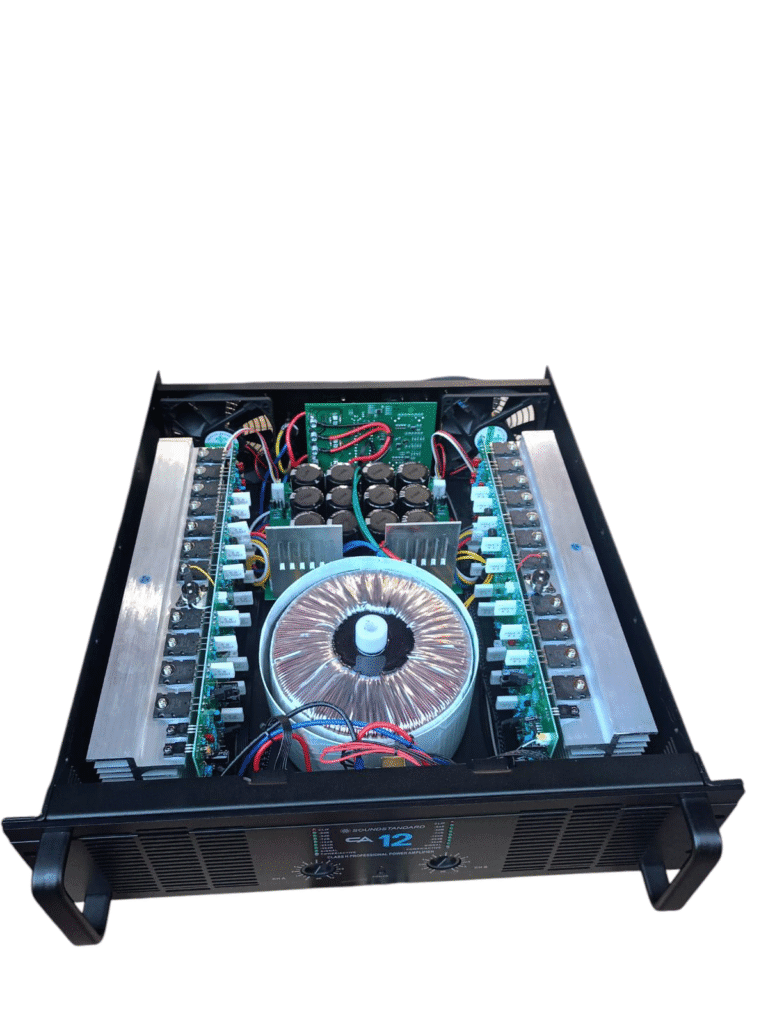
If you’re buying seriously, you should know what’s inside matters.
MOSFETs are typically described as more powerful than transistors in many amplifier designs.
In the video’s shop examples, two amplifiers may look similar but differ in MOSFET count—leading to higher performance in real drive capability.
Capacitors support the amplifier’s ability to keep current stable and smooth.
More (and properly designed) capacitors help with consistent audio output and stability under load.
A toroidal transformer is designed to deliver stable power efficiently.
This is crucial when low frequencies demand big bursts and sustained power.
Fans keep the amplifier from overheating.
Overheating causes protection shutdowns and shortened component life.
So when comparing amps, pay attention to:
Before you buy any Power Amplifiers, do this:
Matching Power Amplifiers to speakers is the difference between a PA that performs for years and a PA that fails mid-event. Remember the beginner rule: speaker demand comes first, and your amplifier must supply it with headroom—especially for bass and low frequencies.
If you want more practical amplifier, speaker, and system matching lessons, subscribe and keep watching DECIBEL AUDIO KENYA / Israel Vibration for the next guides.

© 2026 Decibel Audio Kenya. Designed by Tannbit